
.png)
Description
Download Streamlabs Podcast Editor – AI Transcription, Video‑to‑Text, Free Online Tool
Overview
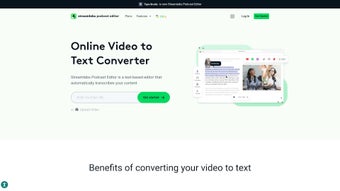
Streamlabs Podcast Editor is a cloud‑based transcription and summarization solution created by typestudio. Positioned in the AI Text Summarizer category, this web‑app transforms spoken audio or video content into clean, readable text with just a single click. Content creators, podcasters, educators, and marketers benefit from the ability to repurpose long‑form media into blog posts, social captions, scripts, or searchable archives without the tedious manual typing process. Because the engine runs entirely online, there is no need to install heavyweight software; a modern browser and an internet connection are all that’s required. The platform leverages state‑of‑the‑art speech‑to‑text models, which are continuously updated to recognize a wide range of accents, industry‑specific jargon, and background noise. While the generated transcript is impressively accurate for an automated solution, the developers advise a brief manual review to catch any mis‑heard words or formatting quirks. This balanced approach gives users the speed of AI while preserving the editorial control of a human proofreader. In addition to raw transcription, Streamlabs Podcast Editor offers summarization features that can condense a 60‑minute episode into a concise paragraph, ideal for SEO‑friendly meta descriptions or teaser content. Overall, the service is designed to maximize the value of existing audio/video assets, improve audience engagement through text‑based distribution, and save countless hours that would otherwise be spent on manual transcription.
Key Features
- One‑Click Transcription: Upload or paste a video/audio URL and receive a full transcript within minutes.
- AI‑Powered Summarizer: Generate short, SEO‑optimized summaries from long recordings.
- Multi‑Language Support: Handles English, Spanish, French, German, and many other languages.
- Speaker Identification: Distinguishes multiple speakers and tags dialogue accordingly.
- Export Options: Download transcripts as .txt, .docx, .pdf, or directly push to Google Docs.
- Editable Inline Editor: Make quick corrections without leaving the browser.
- Secure Cloud Storage: All uploads are encrypted in transit and at rest.
- Integration Hooks: API endpoints for Zapier, WordPress, and HubSpot automation.
- Responsive Design: Works on desktops, tablets, and smartphones.
- Free Tier & Affordable Upgrades: Unlimited basic transcriptions with optional premium features.
Installation & Usage Instructions
Because Streamlabs Podcast Editor is a web‑based service, there is no traditional installation process. Users simply need a compatible browser such as Chrome, Firefox, Safari, or Edge. Follow these steps to get started:
- Create an Account: Visit the official landing page and click “Sign Up.” You can register with an email address or use an existing Google, Apple, or Microsoft account for single‑sign‑on convenience.
- Verify Your Email: A verification link will be sent to your inbox. Click the link to activate your account and gain access to the dashboard.
- Upload Your Media: On the dashboard, choose “New Transcription.” Drag‑and‑drop a local audio/video file (MP4, MP3, WAV, etc.) or paste a YouTube/Vimeo URL. The platform accepts files up to 2 GB on the free plan.
- Select Language & Settings: Choose the primary language, enable speaker detection if needed, and set the desired output format.
- Start Transcription: Hit the “Transcribe” button. The AI engine begins processing; typical turnaround time is 1‑2 minutes per 10 minutes of audio.
- Review & Edit: Once the transcript appears, use the built‑in editor to correct any errors. Keywords are highlighted, and timestamps can be toggled on/off.
- Export or Publish: Click “Export” to download the file or use the integration buttons to push the content to Google Docs, WordPress, or a Zapier workflow.
- Optional Upgrade: If you require higher accuracy, custom vocabularies, or batch processing, consider the premium plan available in the “Billing” section.
The entire workflow is designed for speed and simplicity, making it ideal for busy podcasters who need to turn episodes into blog posts within a few clicks. Because everything runs in the cloud, you can start a transcription on a desktop, continue editing on a tablet, and finalize on a smartphone—all without losing progress.
Compatibility, Pros & Cons
Streamlabs Podcast Editor is platform‑agnostic. As a SaaS solution accessed through a web browser, it works on Windows 10/11, macOS, Linux, Chrome OS, Android, and iOS devices. The responsive UI automatically adapts to different screen sizes, ensuring a consistent experience whether you are using a high‑resolution monitor or a mobile phone.
Pros
- Completely free tier for unlimited basic transcriptions.
- One‑click operation eliminates the learning curve.
- High‑quality AI engine that supports multiple languages.
- Secure cloud storage with end‑to‑end encryption.
- Export options cover most common document formats.
- Integration ready for popular CMS and automation tools.
- Responsive design works on any device.
- Speaker identification adds structure to multi‑person recordings.
- Summarization feature saves time on content repurposing.
- Regular updates improve accuracy and add new features.
Cons
- Accuracy may dip with heavy background noise or strong accents.
- Free tier imposes a limit of 2 GB per file and 60 minutes per month for premium features.
- No offline desktop version for users who prefer local processing.
- Manual review still required for publishing‑grade transcripts.
- Advanced customization (custom vocabularies, domain‑specific models) is locked behind paid plans.
Frequently Asked Questions
Is Streamlabs Podcast Editor truly free?
Yes, the basic transcription service is free with unlimited usage for standard audio lengths. Premium features like batch processing, custom vocabularies, and higher‑accuracy models require a paid subscription.
What file formats can I upload?
Common audio and video formats are supported, including MP3, WAV, AAC, MP4, MOV, and AVI. The platform also accepts direct URLs from YouTube, Vimeo, and other streaming services.
How secure is my uploaded content?
All uploads are encrypted using TLS during transfer and stored encrypted at rest. Streamlabs adheres to GDPR and CCPA standards, ensuring that your data is private and never shared without consent.
Can I edit the transcript after it’s generated?
Absolutely. The built‑in editor lets you correct errors, add punctuation, and insert timestamps. Changes are saved in real time and can be exported in any supported format.
Does the tool work on mobile devices?
Yes. The responsive web design ensures full functionality on Android and iOS browsers. You can upload, transcribe, edit, and export directly from your phone or tablet.
Conclusion & Call to Action
Streamlabs Podcast Editor bridges the gap between audio/video creation and written content distribution. Its AI‑driven transcription engine delivers fast, reasonably accurate results without the need for complex installations or costly licenses. The free tier makes it accessible to hobbyist podcasters, while the premium options provide the scalability that professional studios demand. By converting spoken words into searchable text, you can boost SEO, reach audiences who prefer reading, and repurpose material across multiple channels—all with a single click.
Ready to turn your next podcast episode into a polished blog post? Click here to start your free transcription and experience the convenience of Streamlabs Podcast Editor today.
Streamlabs Podcast Editor impresses with its simplicity and cloud‑based flexibility. The AI delivers solid accuracy for most English content, and the summarization tool is a hidden gem for SEO teams. While a manual proofread is still recommended, the time saved on transcription alone justifies the switch from traditional software. The only drawback is the lack of an offline mode for users who need on‑premise security. Overall, it’s a strong addition to any creator’s toolkit.
Guides & Tutorials for Streamlabs Podcast Editor
How to install Streamlabs Podcast Editor
- Click the Preview / Download button above.
- Once redirected, accept the terms and click Install.
- Wait for the Streamlabs Podcast Editor download to finish on your device.
How to use Streamlabs Podcast Editor
This software is primarily used for its core features described above. Open the app after installation to explore its capabilities.
User Reviews for Streamlabs Podcast Editor 0
No reviews found




